

Once you’ve mastered the essentials with URL.rw’s Standard Blocks, it’s time to explore the Advanced Creative Blocks.
These tools are designed to help you achieve more complex functionality, boost engagement, capture leads, and even monetize your presence directly from your biolink page. If you’re looking to transform your page from a simple list of links into an interactive hub and a powerful business tool, these advanced features are your key.
Let’s dive into how each Advanced Block can elevate your URL.rw biolink:
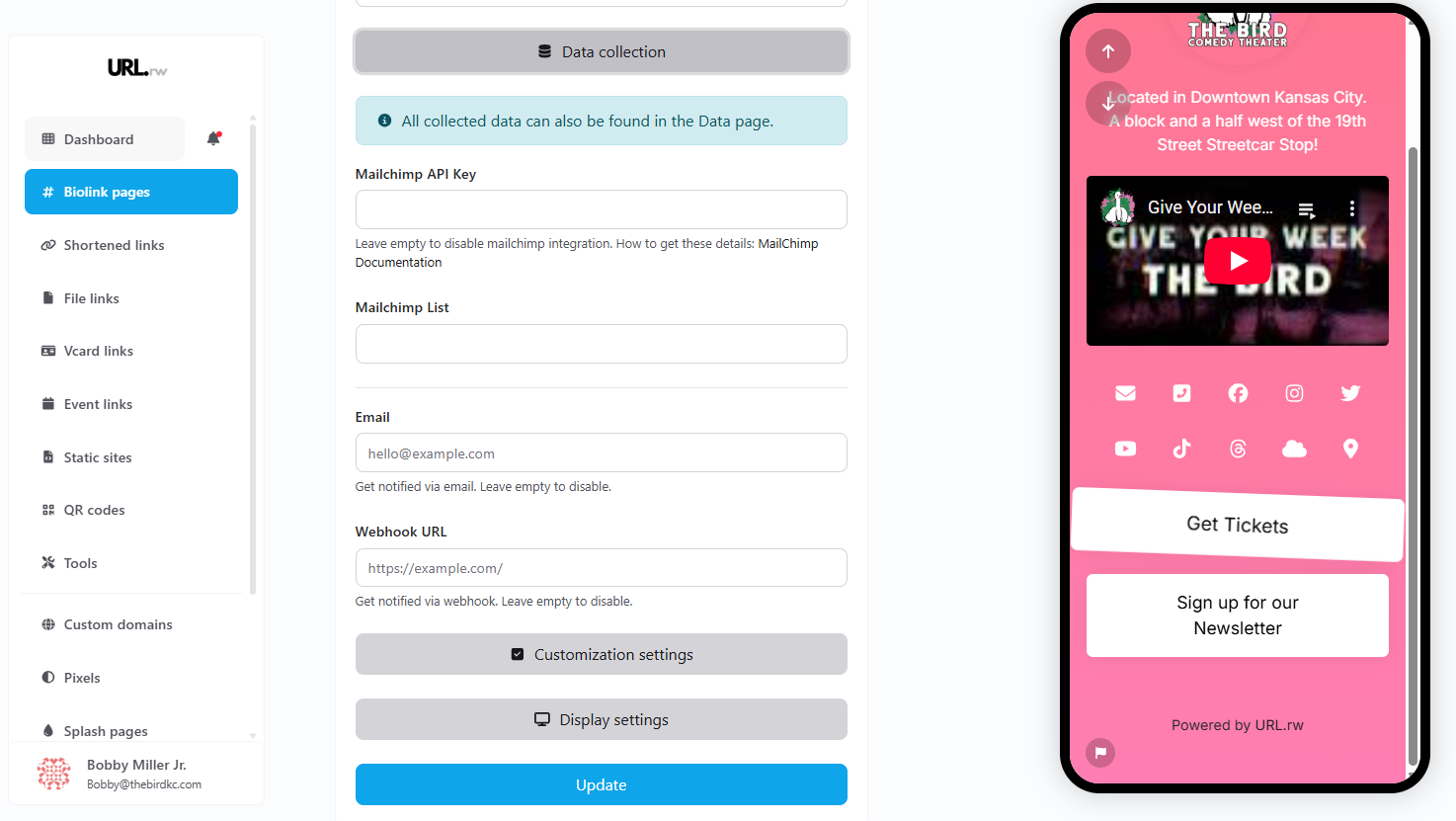
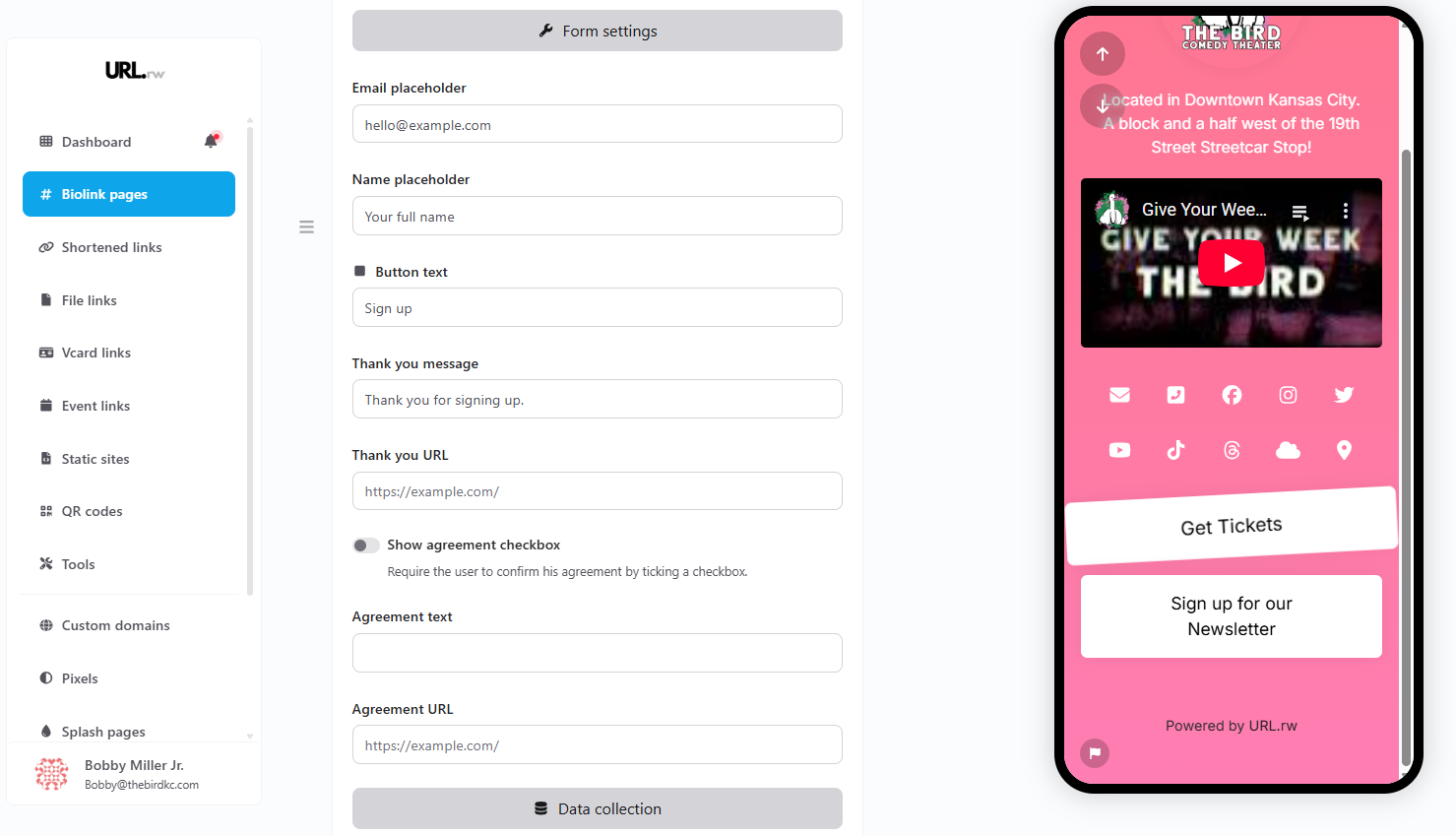
1. Email Collector Block: Build Your Audience & Integrate Seamlessly
- What it is: The Email Collector block in URL.rw is a robust tool for embedding a customizable newsletter signup form directly onto your biolink page. It’s designed not just to capture emails, but to integrate with your existing workflows.
- Why it’s valuable: This is your direct line to growing your most valuable audience asset – your email list. Forget clunky redirects; allow visitors to subscribe with ease, right where they are. This is crucial for nurturing your community, announcing new products, sharing exclusive content, and driving repeat engagement.
Key Features & Benefits of the URL.rw Email Collector:
-
- Direct Lead Capture: Add fields for email and name, with customizable placeholder text (e.g., “hello@example.com,” “Your full name”) to guide users.
- Customizable Call to Action: Tailor the button text (e.g., “Sign up,” “Join Now,” “Get Updates”) to match your brand voice and offer.
Automated Notifications & Integrations:
-
- Email Notifications: Get an email to your specified address (e.g., “hello@example.com”) every time someone signs up.
- Mailchimp Integration: Seamlessly connect your URL.rw biolink to your Mailchimp account. Simply add your Mailchimp API Key and specify the Mailchimp List ID. New subscribers will be automatically added to your chosen list – no manual exporting/importing needed! (URL.rw even provides a link to Mailchimp documentation to help you find these details).
- Webhook URL: For more advanced users or custom CRM integrations, provide a Webhook URL to send subscriber data to other platforms in real-time.
User Experience & Compliance:
-
- Custom Thank You Message: Display a personalized message immediately after signup (e.g., “Thank you for signing up!”).
- Thank You URL Redirect: Optionally redirect subscribers to a specific URL after they sign up (e.g., a welcome page, a special offer, or your latest blog post).
- Agreement Checkbox: Include an optional checkbox for users to confirm their agreement to your terms or privacy policy, with customizable agreement text and a link to your agreement URL. This is vital for GDPR and other privacy compliance.
- Centralized Data Management: All collected data (emails, names) can also be easily found and managed within the “Data page” of your URL.rw dashboard.
- Customization Settings: Fine-tune the look and feel to match your biolink’s design.
With the URL.rw Email Collector, you’re not just getting a form; you’re getting a powerful, integrated list-building machine.
2. Phone Collector Block: Enable Direct SMS Communication
- What it is: Similar to the Email Collector, the Phone Collector block lets you embed a form for visitors to submit their phone numbers, typically for SMS marketing lists or direct contact.
- Why it’s valuable: Open a direct line of communication via SMS for time-sensitive announcements, exclusive offers, or personalized updates. For businesses that leverage text message marketing or offer direct support, this is a powerful lead generation tool. (Ensure compliance with SMS marketing regulations).
3. Contact Form Block: Make It Easy to Get in Touch
- What it is: The Contact Form block allows you to embed a customizable form (e.g., with fields for name, email, message) directly on your biolink page.
- Why it’s valuable: Provide a frictionless way for potential clients, collaborators, or fans to reach out to you without leaving your page or needing to open their email client. This is perfect for inquiries, support requests, or booking information.
4. Map Block: Show Your Location
- What it is: The Map block lets you embed an interactive map (likely from Google Maps or a similar service) to display a specific location.
- Why it’s valuable: Perfect for businesses with physical locations, event organizers, or anyone needing to guide visitors to a specific place. Whether it’s your storefront in Kansas City, a pop-up shop, or an event venue, make it easy for your audience to find you.
5. FAQ Block: Answer Questions Proactively
- What it is: The FAQ block allows you to create a list of frequently asked questions and their answers, often in an accordion or expandable list format.
- Why it’s valuable: Save time and improve user experience by providing instant answers to common queries. This can reduce support requests and help potential customers make informed decisions directly on your biolink page.
6. Countdown Block: Create Urgency and Excitement
- What it is: The Countdown block displays a timer counting down to a specific date and time.
- Why it’s valuable: Build anticipation for launches (product, course, event), highlight limited-time offers, or create a sense of urgency. A visual countdown can significantly boost engagement and drive action before a deadline.
7. External Item Block: Showcase Products or Content Dynamically
- What it is: The External Item block likely allows you to embed or feature a specific item from an external source, such as a product from an e-commerce platform or a specific piece of content.
- Why it’s valuable: Highlight featured products, new arrivals, or specific articles directly on your biolink. This can be more dynamic than a simple link, potentially pulling in images, prices, or descriptions to entice clicks.
8. Share Block: Amplify Your Reach
- What it is: The Share block provides buttons that allow visitors to easily share your biolink page on their own social media profiles or via email/messaging apps.
- Why it’s valuable: Encourage organic growth and word-of-mouth marketing. If visitors find your page valuable, make it simple for them to become advocates and share it with their networks.
9. Coupon Block: Incentivize Action
- What it is: The Coupon block allows you to display a discount code or special offer that visitors can use.
- Why it’s valuable: Drive sales and conversions by offering exclusive discounts directly on your biolink page. This can be a great way to reward your audience or attract new customers.
10. YouTube Feed Block: Keep Content Fresh
- What it is: The YouTube Feed block automatically displays your latest videos from a specified YouTube channel or playlist.
- Why it’s valuable: Keep your biolink page dynamic and engaging by showcasing your newest video content without needing to manually update links. This is excellent for creators who regularly publish on YouTube.
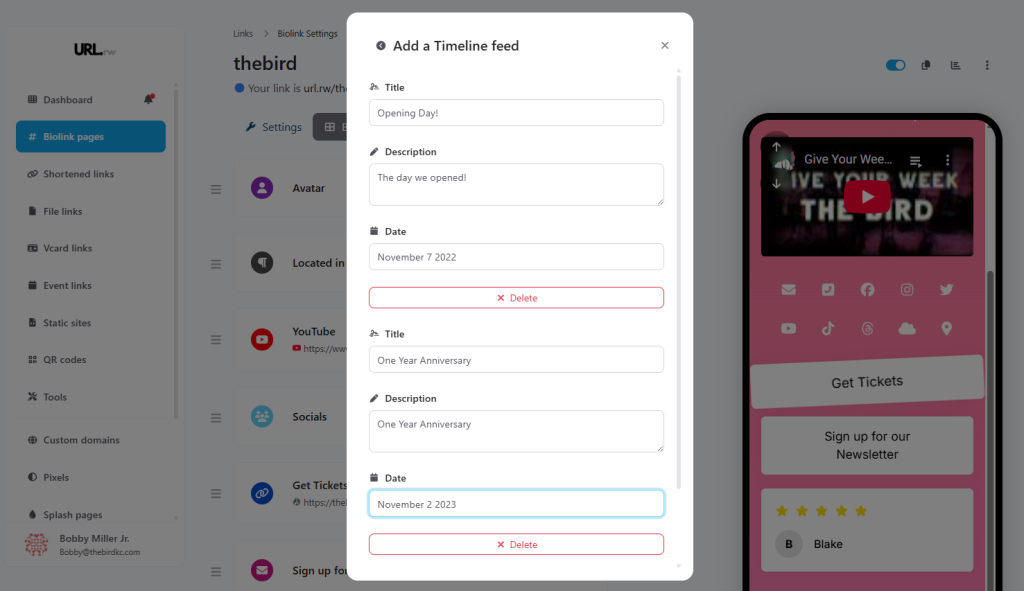
11. Timeline Block: Showcase Your Journey or Schedule
- What it is: The Timeline block allows you to present information in a chronological, linear format.
- Why it’s valuable: Perfect for displaying a company history, a project roadmap, an event schedule, or milestones. It’s a visually engaging way to tell a story or outline a sequence of events.
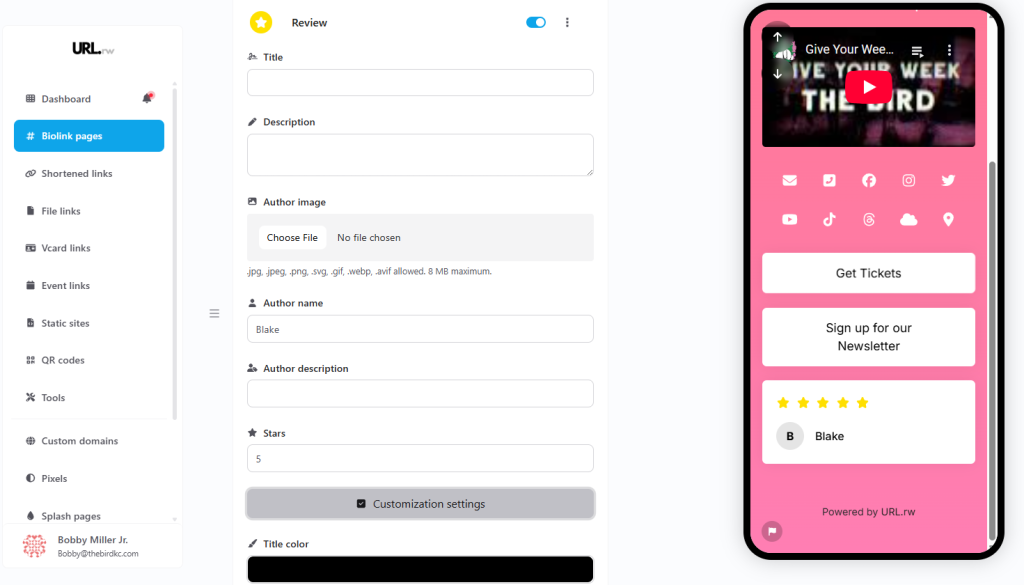
12. Review Block: Build Unshakeable Trust with Authentic Social Proof
- What it is: The Review block in URL.rw empowers you to prominently display testimonials and reviews directly on your biolink page, complete with author details and star ratings.
- Why it’s valuable: Social proof is one of the most powerful tools for building credibility and trust with your audience. Authentic reviews can significantly influence purchasing decisions, encourage engagement, and showcase the real-world value you provide.
Craft Compelling Testimonials with URL.rw’s Review Block Features:
-
- Review Title: Add a catchy headline for the review to grab attention.
- Review Description: Input the full text of the testimonial.
- Author Image: Upload a photo of the reviewer (supports .jpg, .jpeg, .png, .svg, .gif, .webp, .avif, up to 8MB) to add a personal touch and increase authenticity.
- Author Name: Clearly display the name of the person who gave the review (e.g., “Blake”).
- Author Description: Add a short bio or context for the author (e.g., “Satisfied Customer,” “Workshop Attendee”).
- Star Rating: Assign a star rating (1-5 stars) to visually represent the level of satisfaction.
Customization Settings:
-
- Title Color: Adjust the color of the review title to match your branding.
- Further customization options are likely available to ensure the review block integrates seamlessly with your page design.
By showcasing genuine positive feedback, you transform your biolink page into a more persuasive and trustworthy destination. Let your happy customers do the selling for you!
13. Image Slider Block: Dynamic Visual Displays
- What it is: The Image Slider block lets you create a rotating carousel of images.
- Why it’s valuable: Showcase multiple products, portfolio pieces, or promotional graphics in a compact, interactive space. It’s a great way to make your page more visually dynamic and convey more information without clutter.
14. Markdown Block: Custom Formatted Content
- What it is: The Markdown block allows you to input text using Markdown syntax, which then renders as formatted HTML on your page.
- Why it’s valuable: For users familiar with Markdown, this offers a quick and easy way to add custom-styled text, lists, code snippets, or other formatted content without needing a full WYSIWYG editor. It provides flexibility for more technical users or specific formatting needs.
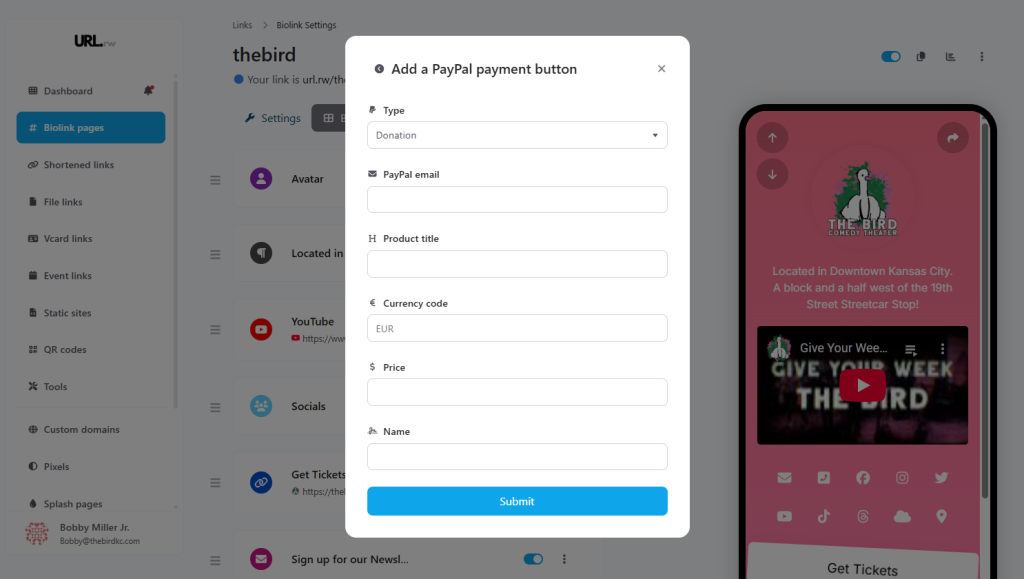
15. PayPal Payments Block: Monetize Your Passion Directly From Your Biolink
- What it is: The PayPal Payments block in URL.rw is your direct gateway to monetization. It allows you to seamlessly add a PayPal payment button to your biolink page, enabling you to sell products, services, or accept donations with ease.
- Why it’s valuable: This transforms your biolink from a content hub into a direct revenue stream. Whether you’re a creator, coach, consultant, artist, or non-profit, you can now offer paid value or receive support without the friction of redirecting users to external platforms.
Unlock Direct Sales & Support with URL.rw’s PayPal IntegrationFlexible Payment Types:
-
- Donation: Easily accept tips, contributions, or support for your work.
- PayPal Email: Enter the email address associated with your PayPal account where you want to receive payments.
- Product Title/Donation Purpose: Clearly label what the payment is for (e.g., “Support My Work,” “E-book Download,” “Consultation Fee”).
- Currency Code: Select the currency for the transaction (e.g., EUR, USD, GBP).
- Price: Set a fixed price for products/services or leave it open/suggested for donations.
- Button Name/Text: Customize the text on the payment button (e.g., “Donate Now,” “Buy Now,” “Support Here”).
- Streamlined User Experience: Visitors can complete transactions using their PayPal account quickly and securely, directly from your URL.rw page.
Versatile Use Cases:
-
- Creators: Sell digital downloads (art, music, presets), offer exclusive content, or receive tips.
- Coaches/Consultants: Sell session bookings or introductory packages.
- Small Businesses: Offer simple products or services directly.
- Non-profits/Causes: Collect donations effectively.
By integrating PayPal payments, URL.rw empowers you to turn your audience engagement into tangible financial support or sales, making your biolink an even more critical component of your online strategy.
URL.rw’s Advanced Creative Blocks, coupled with powerful integrations like Mailchimp and PayPal, transform your biolink page from a simple directory into a sophisticated, interactive, and revenue-generating platform. By leveraging these tools, you can provide richer experiences for your audience, capture valuable leads, build unwavering trust, and achieve your specific business or creator goals more effectively.
